1.9. Transfer Form

Introduction

Transfer is a type of complex transaction that allows to move funds between bank cards (PAN), card tokens (RPI) and Connecting Party bank account (deposits).
Transfer-form integration is relevant for Connecting Party who are not able to accept sender card details (Connecting Party’s website must complete PCI DSS certification). Using Transfer Form integration Connecting Party is released of accepting payment details. In this case the accepting and processing of payment details is carried out on the ChamPay side (if PAN is not sent). This type of integration also allows the Sender (for transfers between cards) or Receiver (for deposit to card) to submit their PAN on ChamPay side.

Note

For this integration type Payout Validation must be used for transfer-form transactions status handling.
All forms can be customized. Follow the Forms Customization reference to see examples and macros of Payment Page Customization, Prefilled Cardholder Data in Payment Page, Wait Page Customization and Finish Page Customization.

See terms definitions in Glossary.

Transfer Form Use-Cases diagram:

hide members
hide circle

circle " " as c2
package From <<Frame>> {
class "Form" as f1a
class "Card number\n(Pan)" as pan1a
class "Reccuring Payment ID\n(RPI)" as rpi1a
class "Connecting Party Account\n(Deposit to card)" as dca

}
package To <<Frame>> {
class "Card number\n(PAN)" as pan2
class "Reccuring Payment ID\n(RPI)" as rpi2
class "Form" as f2

}

f1a --|> pan2
f1a --|> rpi2
f1a -- c2
pan1a -- c2
rpi1a -- c2
dca -- c2
dca -[hidden]> f2
c2 --|> f2

Possible transfer form Use-Cases:

Form to PAN

Transfer from Form to PAN occurs when transferring funds from payment details indicated in form to bank card for which its number is indicated.

Form to RPI

Transfer from Form to RPI occurs when funds are transferred from payment details indicated in form to bank card for which its recurring payment id is indicated.

PAN to Form

Transfer from PAN to Form occurs when funds are transferred from one bank card for which its number is indicated to payment details indicated in form.

RPI to Form

Transfer from RPI to Form occurs when funds are transferred from one bank card for which its recurring payment id is indicated to payment details indicated in form.

Form to Form

Transfer from Form to Form occurs when funds are transferred from payment details indicated in form to another payment details indicated in form.

deposit to Form

Transfer from deposit to Form occurs when funds are transferred from Connecting Party account to payment details indicated in form.

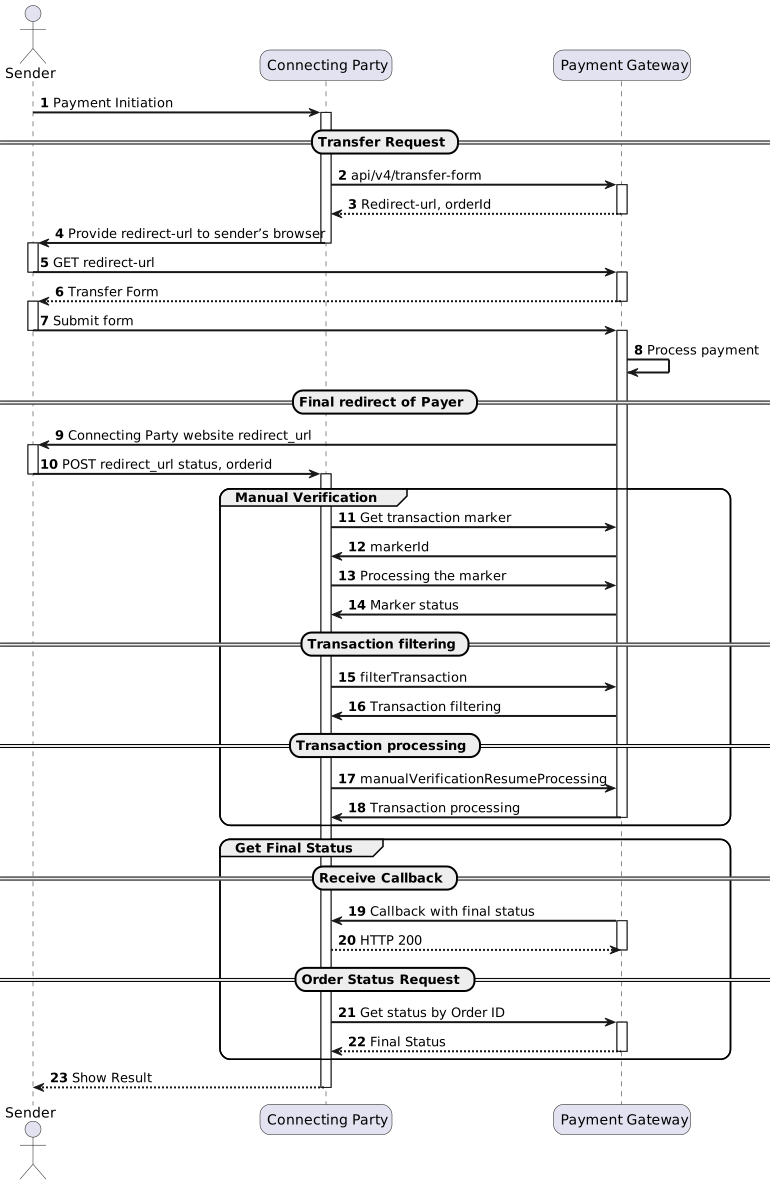
Transfer Flow

      skinparam roundcorner 20
      skinparam sequenceArrowThickness 2
      skinparam ParticipantPadding 30
      autonumber
      actor Sender as Payer
      participant "Connecting Party" as A
      participant "Payment Gateway" as B
      Payer -> A: Payment Initiation
      activate A
      == Transfer Request ==
      A -> B: api/v4/transfer-form
      activate B
      B --> A: Redirect-url, orderId
      deactivate B
      A -> Payer: Provide redirect-url to sender’s browser
      deactivate A
      activate Payer
      Payer -> B: GET redirect-url
      deactivate Payer
      activate B
      B --> Payer: Transfer Form
      deactivate B
      activate Payer
      Payer -> B: Submit form
      deactivate Payer
      activate B
      B -> B: Process payment
      == Final redirect of Payer ==
      B -> Payer: Connecting Party website redirect_url
      activate Payer
      Payer -> A: POST redirect_url status, orderid
      deactivate Payer
      activate A
      group Manual Verification
        A -> B: Get transaction marker
        B -> A: markerId
        A -> B: Processing the marker
        B -> A: Marker status
        == Transaction filtering ==
        A -> B: filterTransaction
        B -> A: Transaction filtering
        == Transaction processing ==
        A -> B: manualVerificationResumeProcessing
        B -> A: Transaction processing
        deactivate B
        end
      group Get Final Status
      == Receive Callback ==
      A <- B: Сallback with final status
      activate B
      B <-- A: HTTP 200
      deactivate B
      == Order Status Request ==
      A -> B: Get status by Order ID
      activate B
      B --> A: Final Status
      deactivate B
      end
      A --> Payer: Show Result
      deactivate Payer
      deactivate A

(1) Transfers between cards are initiated by Sender. Transfer from Connecting Party (deposits) are initiated by Receiver, with the same transaction flow.
(2) To implement transfer-form request see /api/v4/transfer-form/.
(9) To implement final redirect see Final Redirect.
(11) To implement manual verification see Payout Validation.
(19) To implement callback with final status handling see Connecting Party Callbacks.
(21) To implement order status see /api/v2/status/. Status should be requested multiple times with 3-5 seconds interval until final status will be received in response.